URL: https://bytebytego.com/courses/system-design-interview/back-of-the-envelope-estimation
PowerApproximate valueFull nameShort name101 Thousand1 Kilobyte1 KB201 Million1 Megabyte1 MB301 Billion1 Gigabyte1 GB401 Trillion1 Terabyte1 TB501 Quadrillion1 Petabyte1 PB
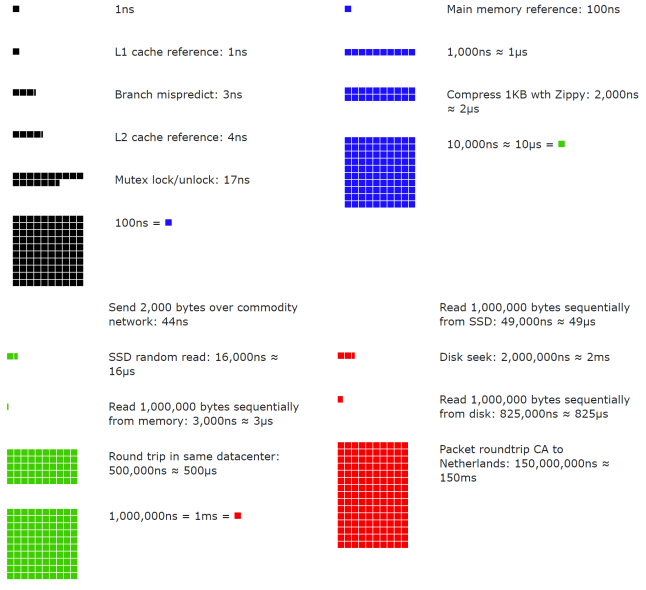
Dr. Dean from Google reveals the length of typical computer operations in 2010 [1]. Some numbers are outdated as computers become faster and more powerful. However, those numbers should still be able to give us an idea of the fastness and slowness of different computer operations.
Operation name
Time
L1 cache reference
0.5 ns
Branch mispredict
5 ns
L2 cache reference
7 ns
Mutex lock/unlock
100 ns
Main memory reference
100 ns
Compress 1K bytes with Zippy
10,000 ns = 10 µs
Send 2K bytes over 1 Gbps network
20,000 ns = 20 µs
Read 1 MB sequentially from memory
250,000 ns = 250 µs
Round trip within the same datacenter
500,000 ns = 500 µs
Disk seek
10,000,000 ns = 10 ms
Read 1 MB sequentially from the network
10,000,000 ns = 10 ms
Read 1 MB sequentially from disk
30,000,000 ns = 30 ms
Send packet CA (California) →Netherlands→CA
150,000,000 ns = 150 ms
Figures 2-1 shows the visualized latency numbers as of 2020 (source of figures: reference material [3]).

A service level agreement (SLA) is a commonly used term for service providers. This is an agreement between you (the service provider) and your customer, and this agreement formally defines the level of uptime your service will deliver. Cloud providers Amazon [4], Google [5] and Microsoft [6] set their SLAs at 99.9% or above. Uptime is traditionally measured in nines. The more the nines, the better.
the number of nines correlate to the expected system downtime.
Availability %
Downtime per day
Downtime per week
Downtime per month
Downtime per year
99%
14.40 minutes
1.68 hours
7.31 hours
3.65 days
99.99%
8.64 seconds
1.01 minutes
4.38 minutes
52.60 minutes
99.999%
864.00
6.05 seconds
26.30 seconds
5.26 minutes
99.9999%
86.40 milliseconds
604.80
2.63 seconds
31.56 seconds
Table 3
Example: Estimate Twitter QPS and storage requirements
Please note the following numbers are for this exercise only as they are not real numbers from Twitter.
Assumptions:
• 300 million monthly active users.
• 50% of users use Twitter daily.
• Users post 2 tweets per day on average.
• 10% of tweets contain media.
• Data is stored for 5 years.
Estimations:
Query per second (QPS) estimate:
• Daily active users (DAU) = 300 million * 50% = 150 million
• Tweets QPS = 150 million * 2 tweets / 24 hour / 3600 seconds = ~3500
• Peek QPS = 2 * QPS = ~7000
We will only estimate media storage here.
• Average tweet size:
• tweet_id 64 bytes
• text 140 bytes
• media 1 MB
• Media storage: 150 million * 2 * 10% * 1 MB = 30 TB per day
• 5-year media storage: 30 TB * 365 * 5 = ~55 PB
Back-of-the-envelope estimation is all about the process. Solving the problem is more important than obtaining results. Interviewers may test your problem-solving skills. Here are a few tips to follow:
• Rounding and Approximation. It is difficult to perform complicated math operations during the interview. For example, what is the result of “99987 / 9.1”? There is no need to spend valuable time to solve complicated math problems. Precision is not expected. Use round numbers and approximation to your advantage. The division question can be simplified as follows: “100,000 / 10”.
• Write down your assumptions. It is a good idea to write down your assumptions to be referenced later.
• Label your units. When you write down “5”, does it mean 5 KB or 5 MB? You might confuse yourself with this. Write down the units because “5 MB” helps to remove ambiguity.
• Commonly asked back-of-the-envelope estimations: QPS, peak QPS, storage, cache, number of servers, etc. You can practice these calculations when preparing for an interview. Practice makes perfect.