Scale From Zero To Millions Of Users by ByteByteGo
URL: https://bytebytego.com/courses/system-design-interview/scale-from-zero-to-millions-of-users

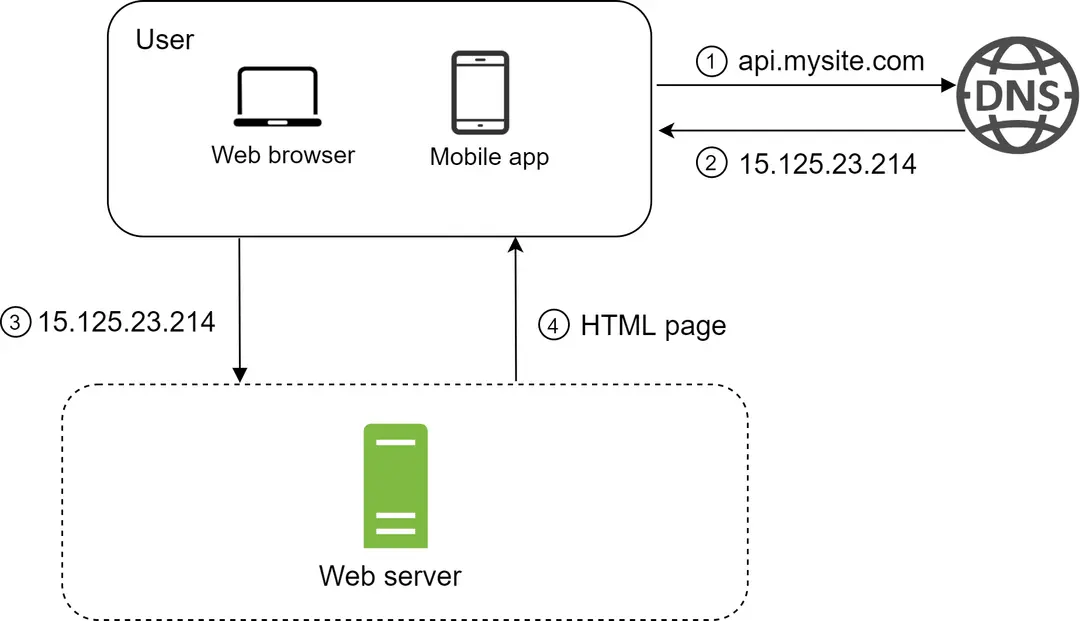
Figure 2
-
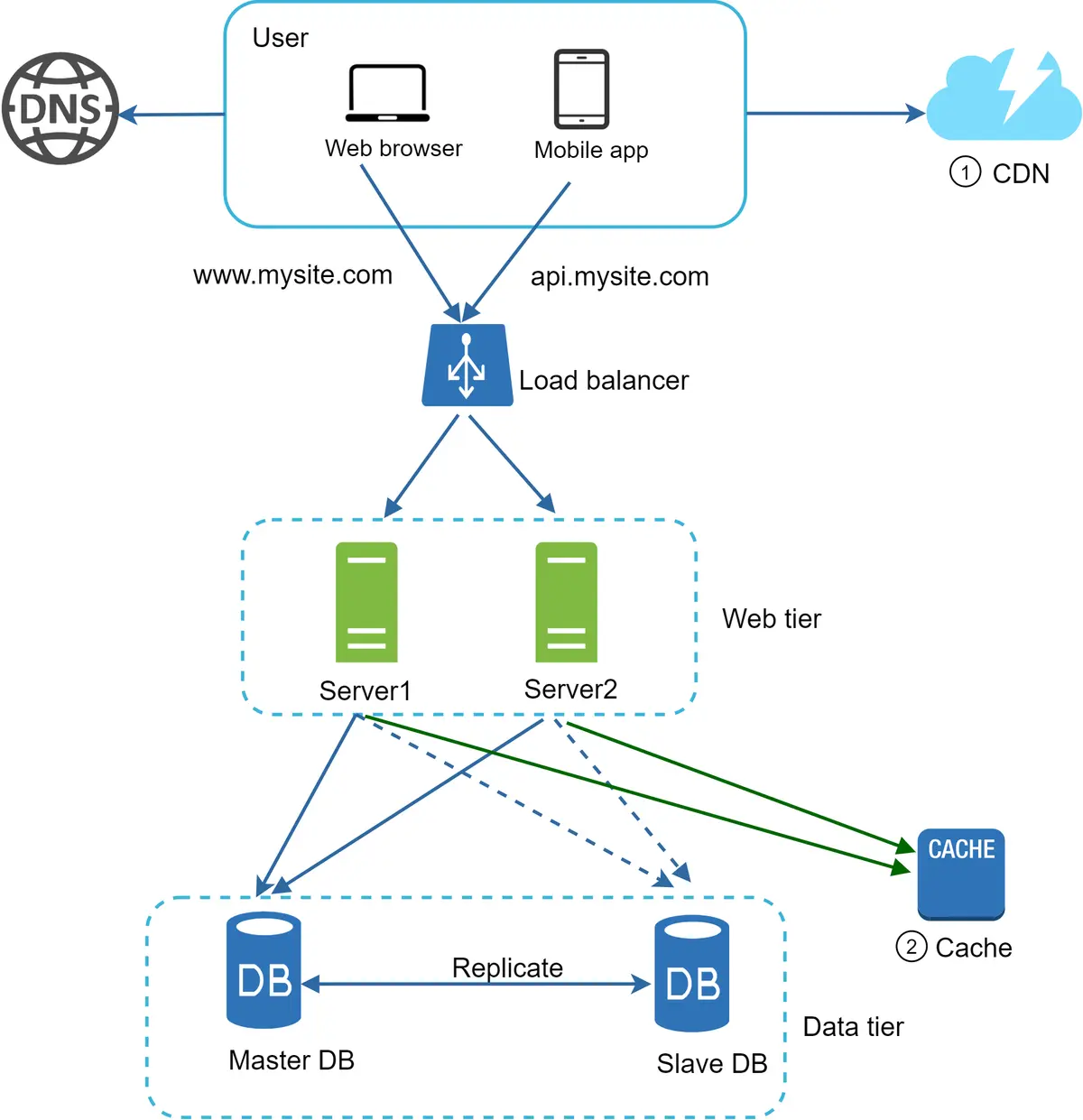
Users access websites through domain names, such as api.mysite.com. Usually, the Domain Name System (DNS) is a paid service provided by 3rd parties and not hosted by our servers.
-
Internet Protocol (IP) address is returned to the browser or mobile app. In the example, IP address 15.125.23.214 is returned.
-
Once the IP address is obtained, Hypertext Transfer Protocol (HTTP) [1] requests are sent directly to your web server.
Separating web/mobile traffic (web tier) and database (data tier) servers allows them to be scaled independently.

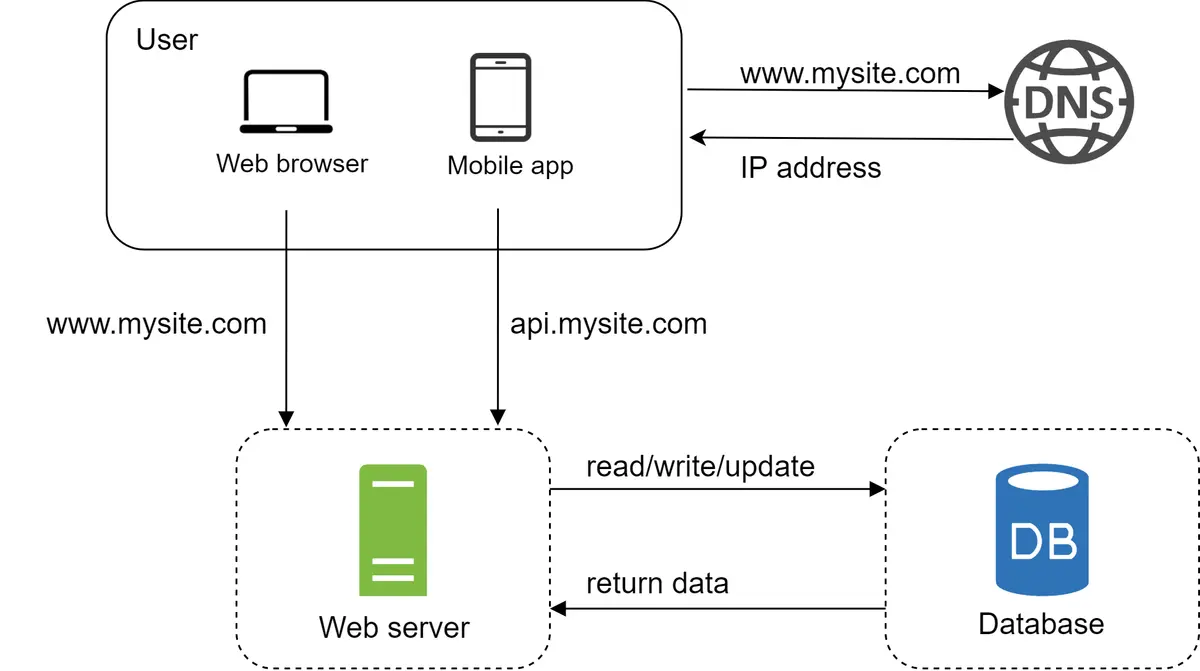
Relational databases represent and store data in tables and rows. You can perform join operations using SQL across different database tables.
Non-Relational databases are also called NoSQL databases. Popular ones are CouchDB, Neo4j, Cassandra, HBase, Amazon DynamoDB, etc. [2]. These databases are grouped into four categories: key-value stores, graph stores, column stores, and document stores. Join operations are generally not supported in non-relational databases.
Non-relational databases might be the right choice if:
• Your application requires super-low latency.
• Your data are unstructured, or you do not have any relational data.
• You only need to serialize and deserialize data (JSON, XML, YAML, etc.).
• You need to store a massive amount of data.
Vertical scaling, referred to as “scale up”, means the process of adding more power (CPU, RAM, etc.) to your servers. Horizontal scaling, referred to as “scale-out”, allows you to scale by adding more servers into your pool of resources.
When traffic is low, vertical scaling is a great option, and the simplicity of vertical scaling is its main advantage.
Vertical scaling has a hard limit. It is impossible to add unlimited CPU and memory to a single server.
• Vertical scaling does not have failover and redundancy. If one server goes down, the website/app goes down with it completely.
In another scenario, if many users access the web server simultaneously and it reaches the web server’s load limit, users generally experience slower response or fail to connect to the server.
A load balancer evenly distributes incoming traffic among web servers that are defined in a load-balanced set. Figure 4 shows how a load balancer works.
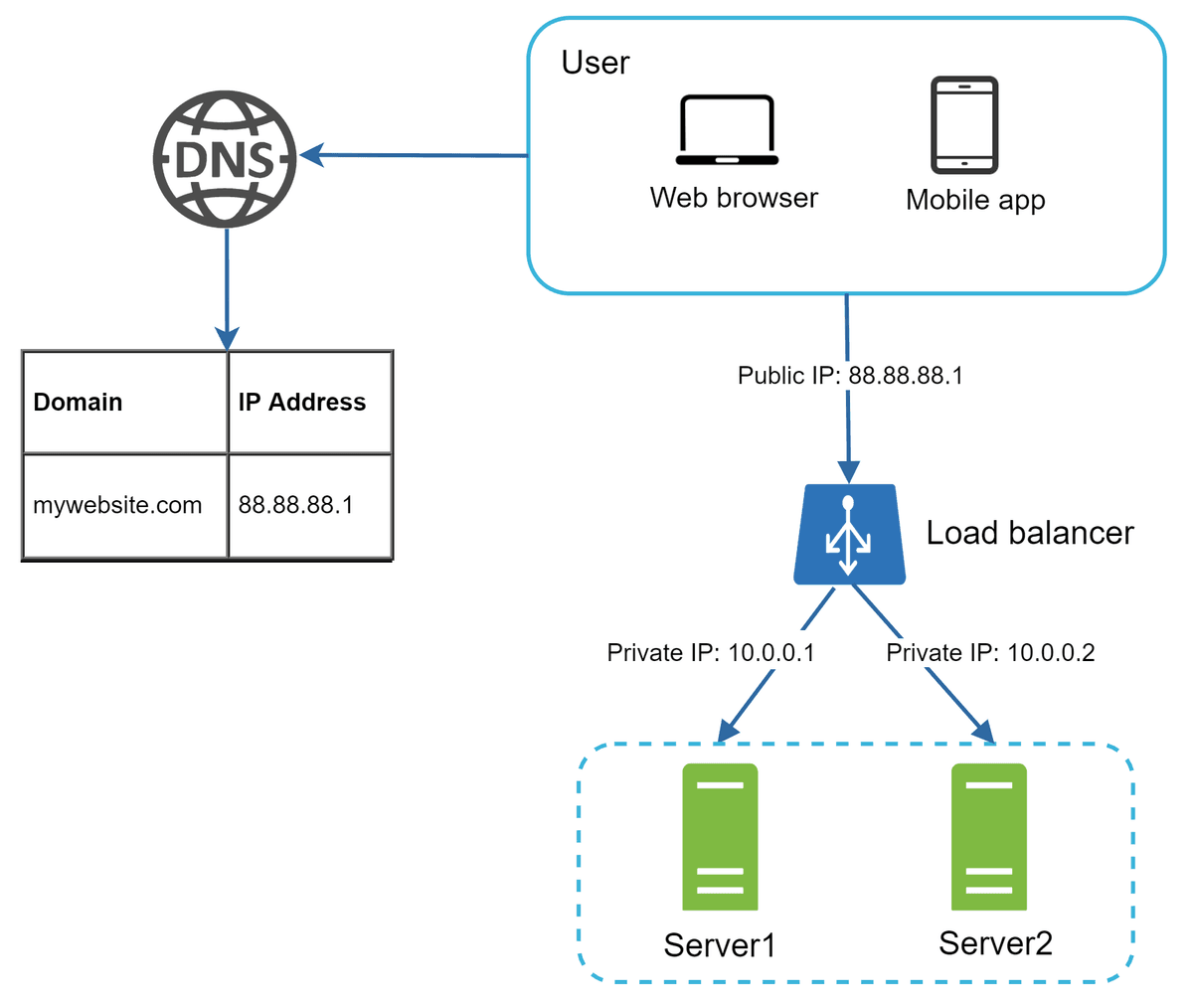
users connect to the public IP of the load balancer directly. With this setup, web servers are unreachable directly by clients anymore. For better security, private IPs are used for communication between servers
• If the website traffic grows rapidly, and two servers are not enough to handle the traffic, the load balancer can handle this problem gracefully. You only need to add more servers to the web server pool, and the load balancer automatically starts to send requests to them.
Database replication can be used in many database management systems, usually with a master/slave relationship between the original (master) and the copies (slaves)”
master database generally only supports write operations. A slave database gets copies of the data from the master database and only supports read operations
Most applications require a much higher ratio of reads to writes; thus, the number of slave databases in a system is usually larger than the number of master databases.

Advantages of database replication:
• Better performance: In the master-slave model, all writes and updates happen in master nodes; whereas, read operations are distributed across slave nodes. This model improves performance because it allows more queries to be processed in parallel.
• Reliability: If one of your database servers is destroyed by a natural disaster, such as a typhoon or an earthquake, data is still preserved. You do not need to worry about data loss because data is replicated across multiple locations.
• High availability: By replicating data across different locations, your website remains in operation even if a database is offline as you can access data stored in another database server.
what if one of the databases goes offline? The architectural design discussed in Figure 5 can handle this case:
• If only one slave database is available and it goes offline, read operations will be directed to the master database temporarily. As soon as the issue is found, a new slave database will replace the old one. In case multiple slave databases are available, read operations are redirected to other healthy slave databases. A new database server will replace the old one.
• If the master database goes offline, a slave database will be promoted to be the new master. All the database operations will be temporarily executed on the new master database. A new slave database will replace the old one for data replication immediately. In production systems, promoting a new master is more complicated as the data in a slave database might not be up to date. The missing data needs to be updated by running data recovery scripts. Although some other replication methods like multi-masters and circular replication could help, those setups are more complicated; and their discussions are beyond the scope of this course. Interested readers should refer to the listed reference materials [4] [5].
The cache tier is a temporary data store layer, much faster than the database. The benefits of having a separate cache tier include better system performance, ability to reduce database workloads, and the ability to scale the cache tier independently.

After receiving a request, a web server first checks if the cache has the available response. If it has, it sends data back to the client. If not, it queries the database, stores the response in cache, and sends it back to the client. This caching strategy is called a read-through cache. Other caching strategies are available depending on the data type, size, and access patterns.
Note: Web server calls the DB if data is not present in cache
Decide when to use cache. Consider using cache when data is read frequently but modified infrequently. Since cached data is stored in volatile memory, a cache server is not ideal for persisting data.
Expiration policy. It is a good practice to implement an expiration policy. Once cached data is expired, it is removed from the cache. When there is no expiration policy, cached data will be stored in the memory permanently. It is advisable not to make the expiration date too short as this will cause the system to reload data from the database too frequently. Meanwhile, it is advisable not to make the expiration date too long as the data can become stale.
Consistency: This involves keeping the data store and the cache in sync. Inconsistency can happen because data-modifying operations on the data store and cache are not in a single transaction. When scaling across multiple regions, maintaining consistency between the data store and cache is challenging.
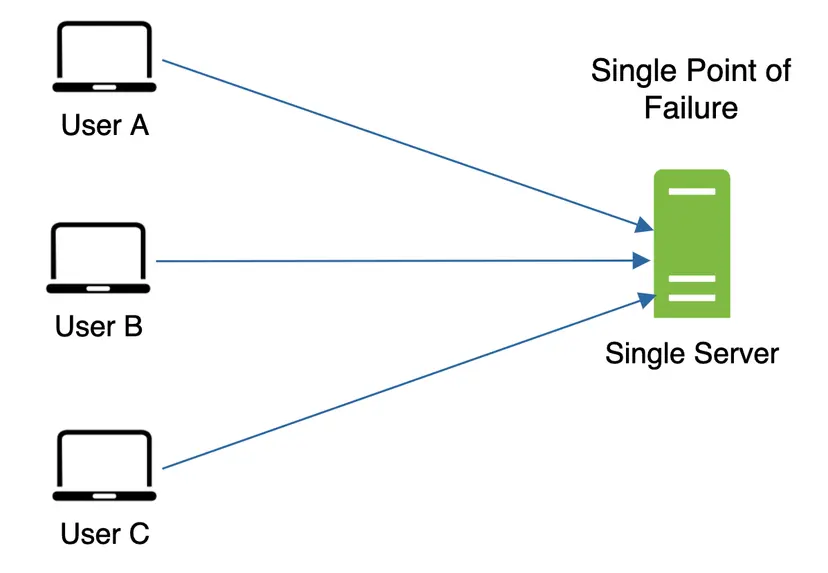
Mitigating failures: A single cache server represents a potential single point of failure (SPOF)
• As a result, multiple cache servers across different data centers are recommended to avoid SPOF. Another recommended approach is to overprovision the required memory by certain percentages. This provides a buffer as the memory usage increases.
done till here
Eviction Policy: Once the cache is full, any requests to add items to the cache might cause existing items to be removed. This is called cache eviction. Least-recently-used (LRU) is the most popular cache eviction policy. Other eviction policies, such as the Least Frequently Used (LFU) or First in First Out (FIFO), can be adopted to satisfy different use cases.
A CDN is a network of geographically dispersed servers used to deliver static content. CDN servers cache static content like images, videos, CSS, JavaScript files, etc.
Here is how CDN works at the high-level: when a user visits a website, a CDN server closest to the user will deliver static content.
Figure 9 is a great example that shows how CDN improves load time.


Figure 9
Figure 10 demonstrates the CDN workflow.

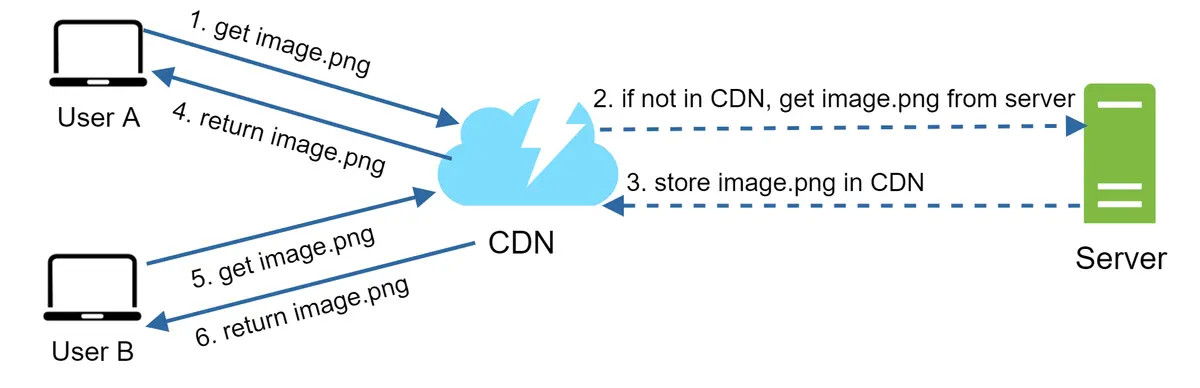
- User A tries to get image.png by using an image URL. The URL’s domain is provided by the CDN provider. The following two image URLs are samples used to demonstrate what image URLs look like on Amazon and Akamai CDNs:
• https://mysite.cloudfront.net/logo.jpg
• https://mysite.akamai.com/image-manager/img/logo.jpg
-
If the CDN server does not have image.png in the cache, the CDN server requests the file from the origin, which can be a web server or online storage like Amazon S3.
-
The origin returns image.png to the CDN server, which includes optional HTTP header Time-to-Live (TTL) which describes how long the image is cached.
-
The CDN caches the image and returns it to User A. The image remains cached in the CDN until the TTL expires.
-
User B sends a request to get the same image.
-
The image is returned from the cache as long as the TTL has not expired.
Cost: CDNs are run by third-party providers, and you are charged for data transfers in and out of the CDN. Caching infrequently used assets provides no significant benefits so you should consider moving them out of the CDN.
Setting an appropriate cache expiry: For time-sensitive content, setting a cache expiry time is important.
• CDN fallback: You should consider how your website/application copes with CDN failure. If there is a temporary CDN outage, clients should be able to detect the problem and request resources from the origin.
• Invalidating files: You can remove a file from the CDN before it expires by performing one of the following operations:
• Invalidate the CDN object using APIs provided by CDN vendors.
• Use object versioning to serve a different version of the object. To version an object, you can add a parameter to the URL, such as a version number. For example, version number 2 is added to the query string: image.png?v=2.
Now it is time to consider scaling the web tier horizontally. For this, we need to move state (for instance user session data) out of the web tier. A good practice is to store session data in the persistent storage such as relational database or NoSQL. Each web server in the cluster can access state data from databases. This is called stateless web tier.
A stateful server and stateless server has some key differences. A stateful server remembers client data (state) from one request to the next. A stateless server keeps no state information.
Figure 12 shows an example of a stateful architecture.

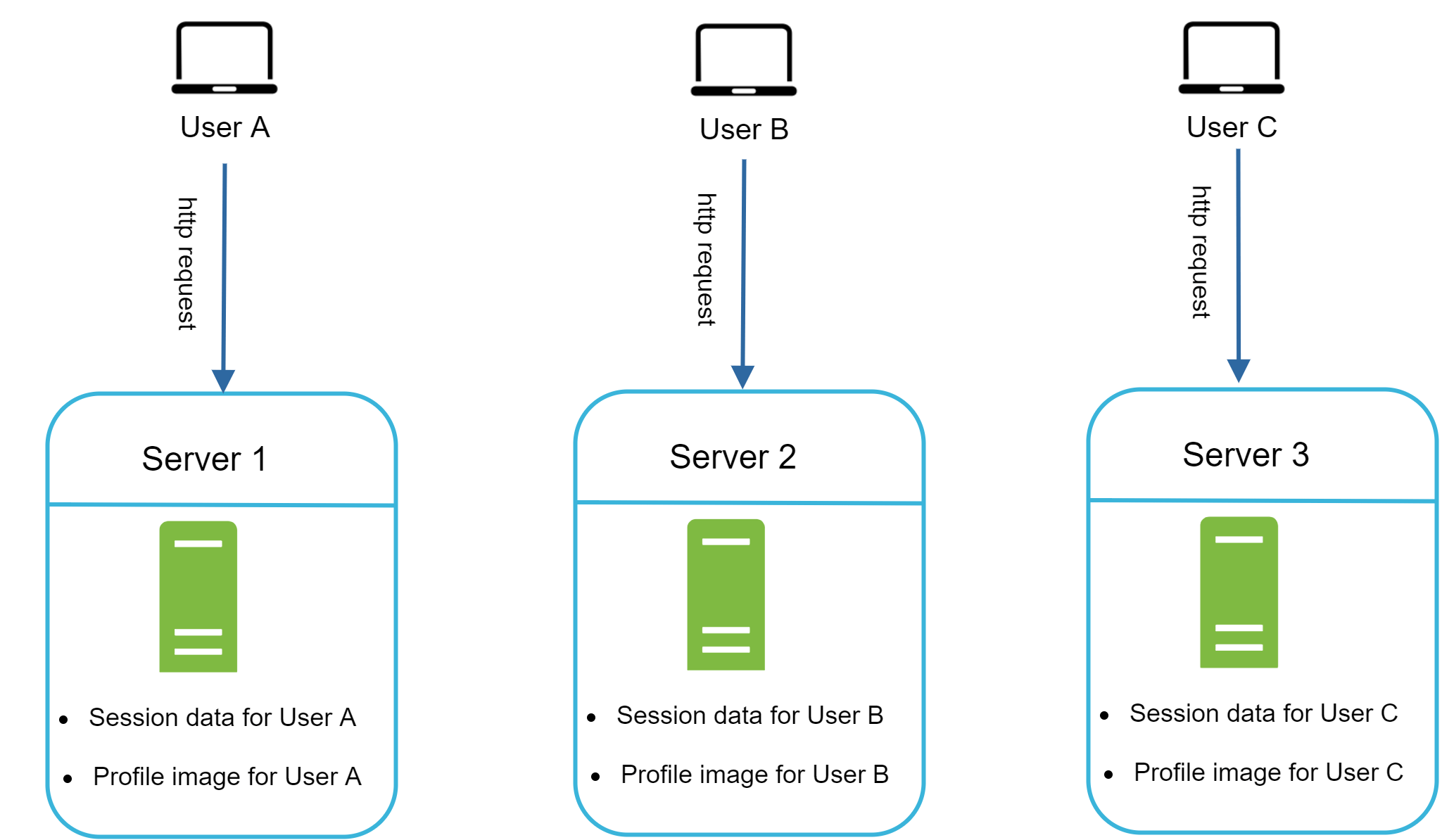
In Figure 12, user A’s session data and profile image are stored in Server 1. To authenticate User A, HTTP requests must be routed to Server 1. If a request is sent to other servers like Server 2, authentication would fail because Server 2 does not contain User A’s session data. Similarly, all HTTP requests from User B must be routed to Server 2; all requests from User C must be sent to Server 3.
The issue is that every request from the same client must be routed to the same server. This can be done with sticky sessions in most load balancers [10]; however, this adds the overhead. Adding or removing servers is much more difficult with this approach. It is also challenging to handle server failures.
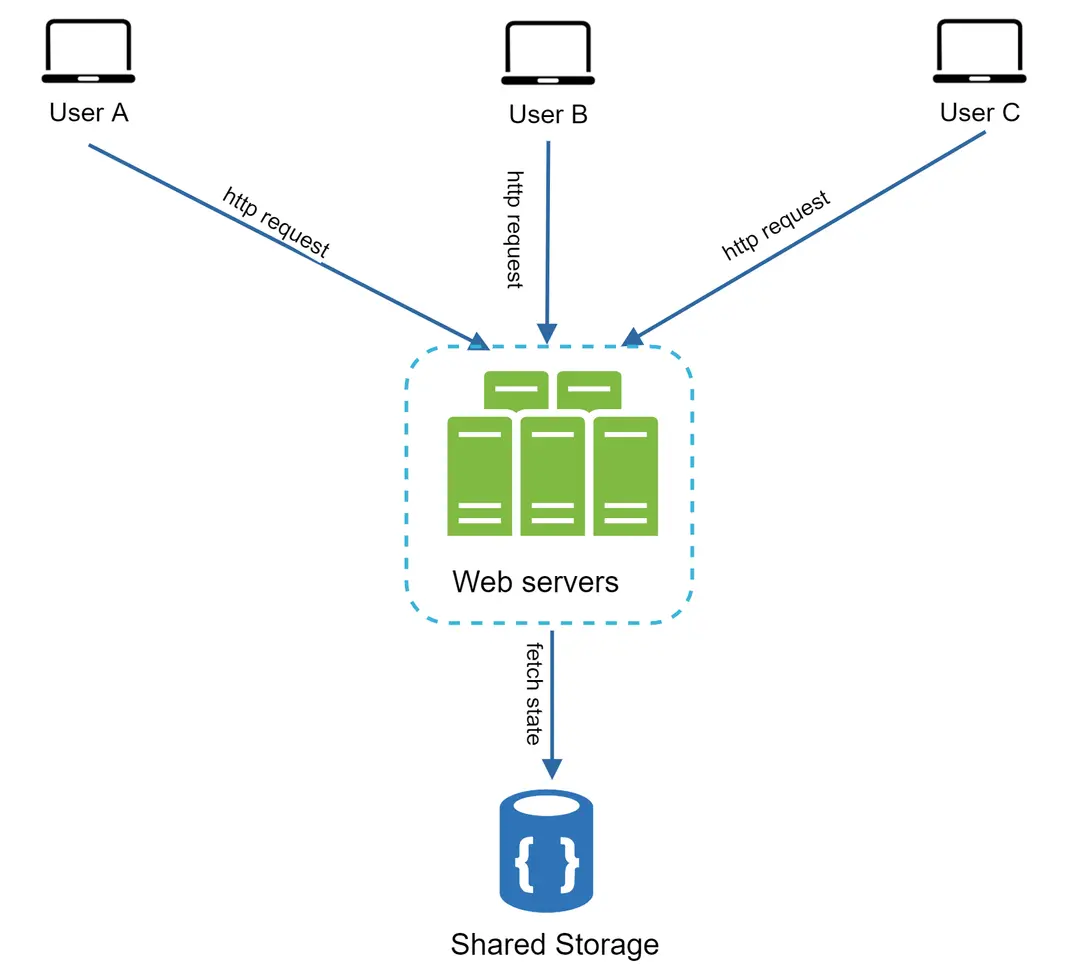
Figure 13
In this stateless architecture, HTTP requests from users can be sent to any web servers, which fetch state data from a shared data store. State data is stored in a shared data store and kept out of web servers. A stateless system is simpler, more robust, and scalable.
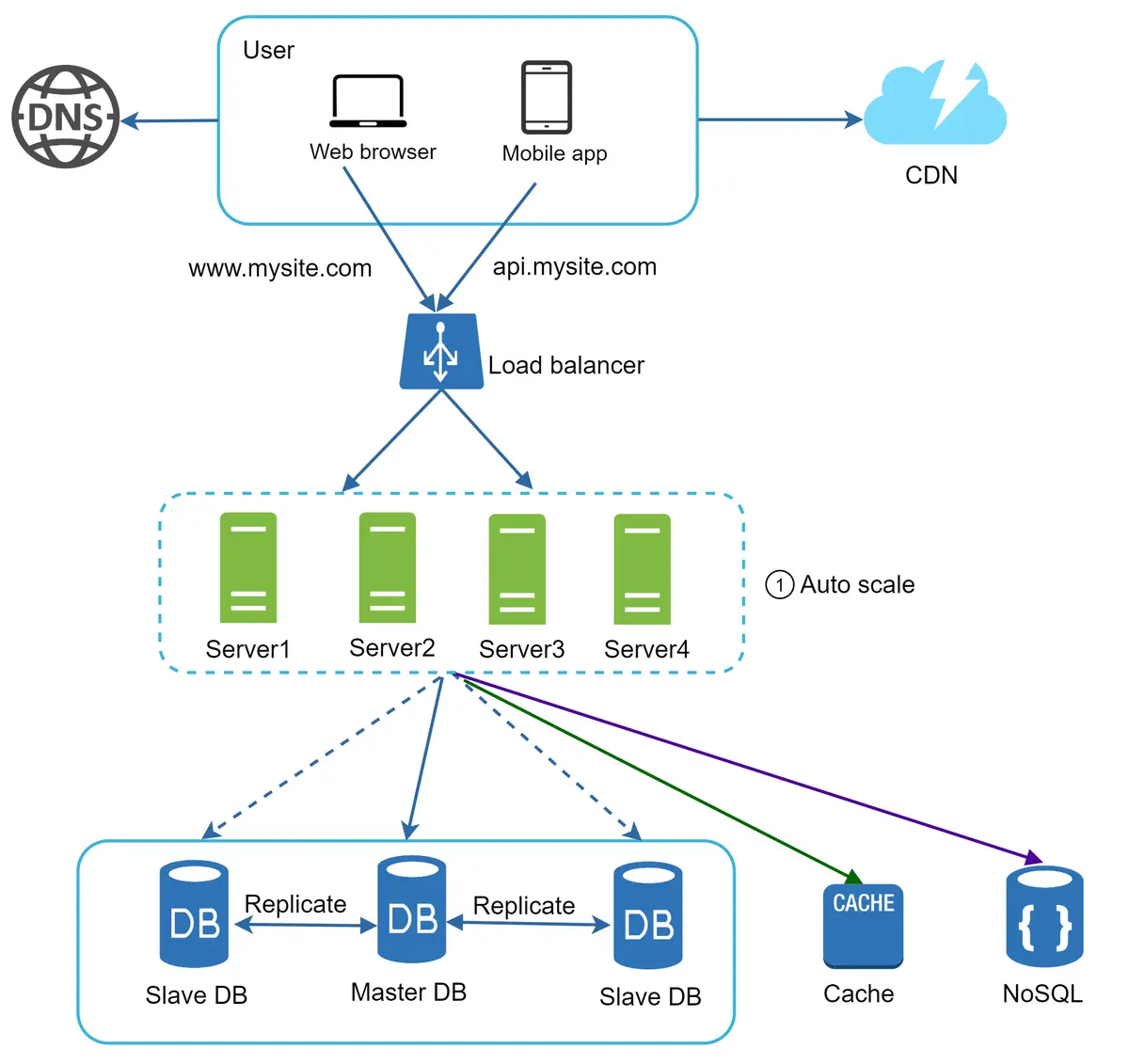
Figure 14
In Figure 14, we move the session data out of the web tier and store them in the persistent data store. The shared data store could be a relational database, Memcached/Redis, NoSQL, etc. The NoSQL data store is chosen as it is easy to scale.
Figure 15 shows an example setup with two data centers. In normal operation, users are geoDNS-routed, also known as geo-routed, to the closest data center, with a split traffic of x% in US-East and (100 – x)% in US-West. geoDNS is a DNS service that allows domain names to be resolved to IP addresses based on the location of a user.

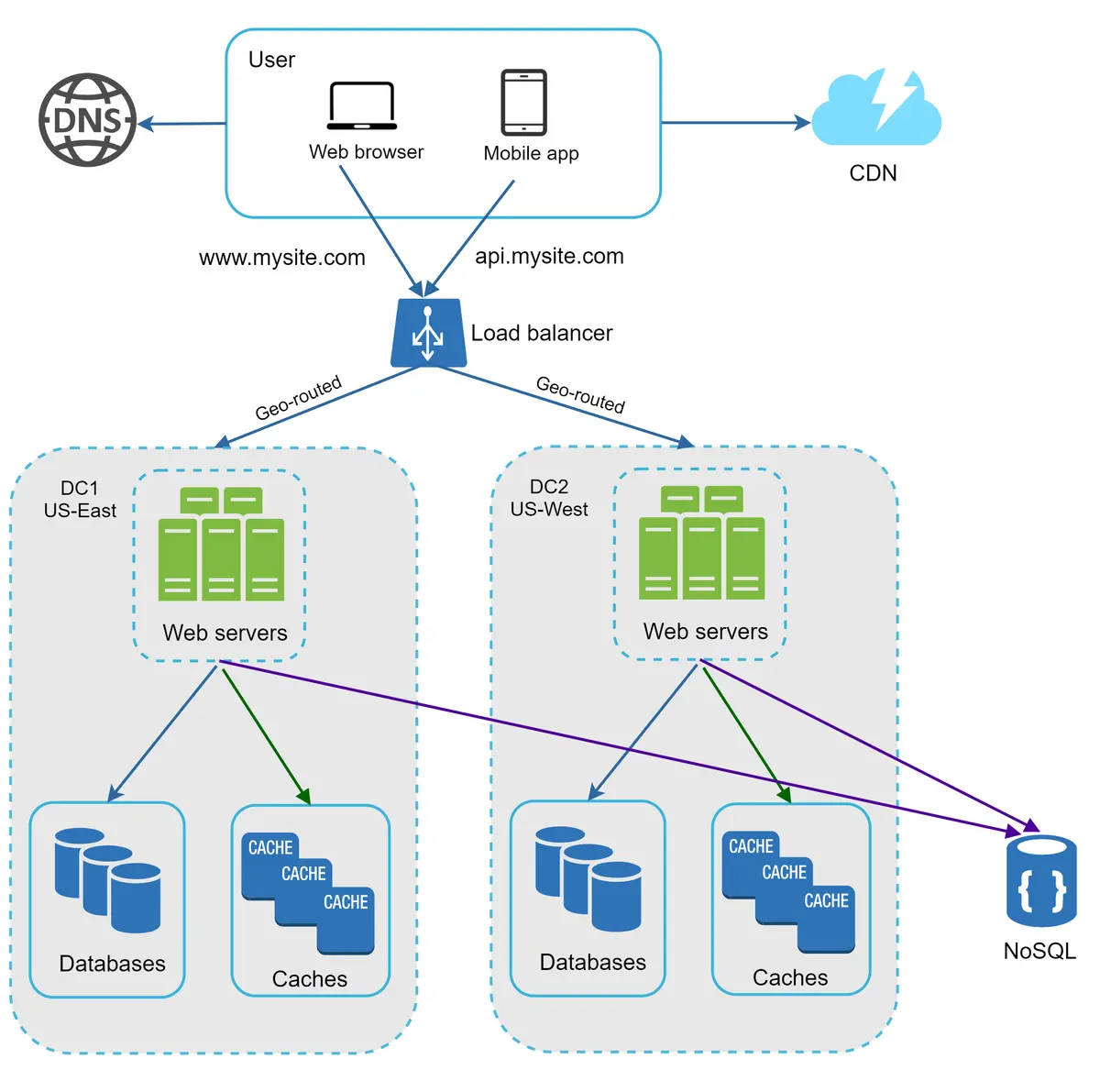
Figure 15
• Traffic redirection: Effective tools are needed to direct traffic to the correct data center. GeoDNS can be used to direct traffic to the nearest data center depending on where a user is located.
• Data synchronization: Users from different regions could use different local databases or caches. In failover cases, traffic might be routed to a data center where data is unavailable. A common strategy is to replicate data across multiple data centers. A previous study shows how Netflix implements asynchronous multi-data center replication [11].
• Test and deployment: With multi-data center setup, it is important to test your website/application at different locations. Automated deployment tools are vital to keep services consistent through all the data centers [11].
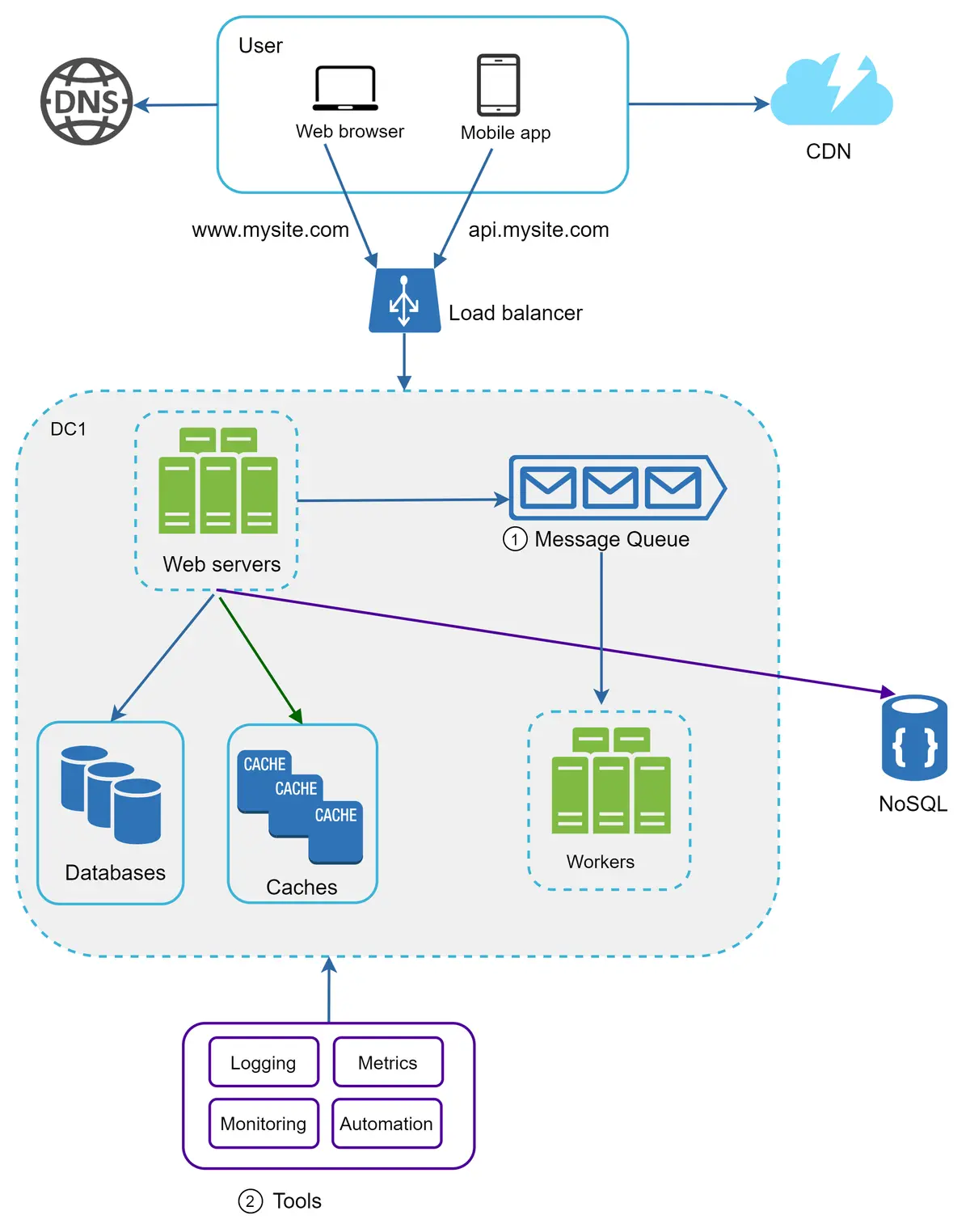
A message queue is a durable component, stored in memory, that supports asynchronous communication. It serves as a buffer and distributes asynchronous requests. The basic architecture of a message queue is simple. Input services, called producers/publishers, create messages, and publish them to a message queue. Other services or servers, called consumers/subscribers, connect to the queue, and perform actions defined by the messages. The model is shown in Figure 17.


Decoupling makes the message queue a preferred architecture for building a scalable and reliable application. With the message queue, the producer can post a message to the queue when the consumer is unavailable to process it. The consumer can read messages from the queue even when the producer is unavailable.
Logging: Monitoring error logs is important because it helps to identify errors and problems in the system. You can monitor error logs at per server level or use tools to aggregate them to a centralized service for easy search and viewing.
Metrics: Collecting different types of metrics help us to gain business insights and understand the health status of the system. Some of the following metrics are useful:
• Host level metrics: CPU, Memory, disk I/O, etc.
• Aggregated level metrics: for example, the performance of the entire database tier, cache tier, etc.
• Key business metrics: daily active users, retention, revenue, etc.
Automation: When a system gets big and complex, we need to build or leverage automation tools to improve productivity. Continuous integration is a good practice, in which each code check-in is verified through automation, allowing teams to detect problems early. Besides, automating your build, test, deploy process, etc. could improve developer productivity significantly.
Vertical scaling, also known as scaling up, is the scaling by adding more power (CPU, RAM, DISK, etc.) to an existing machine. There are some powerful database servers. According to Amazon Relational Database Service (RDS) [12], you can get a database server with 24 TB of RAM. This kind of powerful database server could store and handle lots of data. For example, stackoverflow.com in 2013 had over 10 million monthly unique visitors, but it only had 1 master database [13]. However, vertical scaling comes with some serious drawbacks:
• You can add more CPU, RAM, etc. to your database server, but there are hardware limits. If you have a large user base, a single server is not enough.
• Greater risk of single point of failures.
• The overall cost of vertical scaling is high. Powerful servers are much more expensive.
Horizontal scaling, also known as sharding, is the practice of adding more servers. Figure 20 compares vertical scaling with horizontal scaling.

Sharding separates large databases into smaller, more easily managed parts called shards. Each shard shares the same schema, though the actual data on each shard is unique to the shard.
igure 21 shows an example of sharded databases. User data is allocated to a database server based on user IDs. Anytime you access data, a hash function is used to find the corresponding shard. In our example, user_id % 4 is used as the hash function. If the result equals to 0, shard 0 is used to store and fetch data. If the result equals to 1, shard 1 is used. The same logic applies to other shards.


Figure 22
The most important factor to consider when implementing a sharding strategy is the choice of the sharding key. Sharding key (known as a partition key) consists of one or more columns that determine how data is distributed. As shown in Figure 22, “user_id” is the sharding key. A sharding key allows you to retrieve and modify data efficiently by routing database queries to the correct database. When choosing a sharding key, one of the most important criteria is to choose a key that can evenly distributed data.
Resharding data: Resharding data is needed when 1) a single shard could no longer hold more data due to rapid growth. 2) Certain shards might experience shard exhaustion faster than others due to uneven data distribution. When shard exhaustion happens, it requires updating the sharding function and moving data around. Consistent hashing is a commonly used technique to solve this problem.
Celebrity problem: This is also called a hotspot key problem. Excessive access to a specific shard could cause server overload. Imagine data for Katy Perry, Justin Bieber, and Lady Gaga all end up on the same shard. For social applications, that shard will be overwhelmed with read operations. To solve this problem, we may need to allocate a shard for each celebrity. Each shard might even require further partition.
Join and de-normalization: Once a database has been sharded across multiple servers, it is hard to perform join operations across database shards. A common workaround is to de-normalize the database so that queries can be performed in a single table.
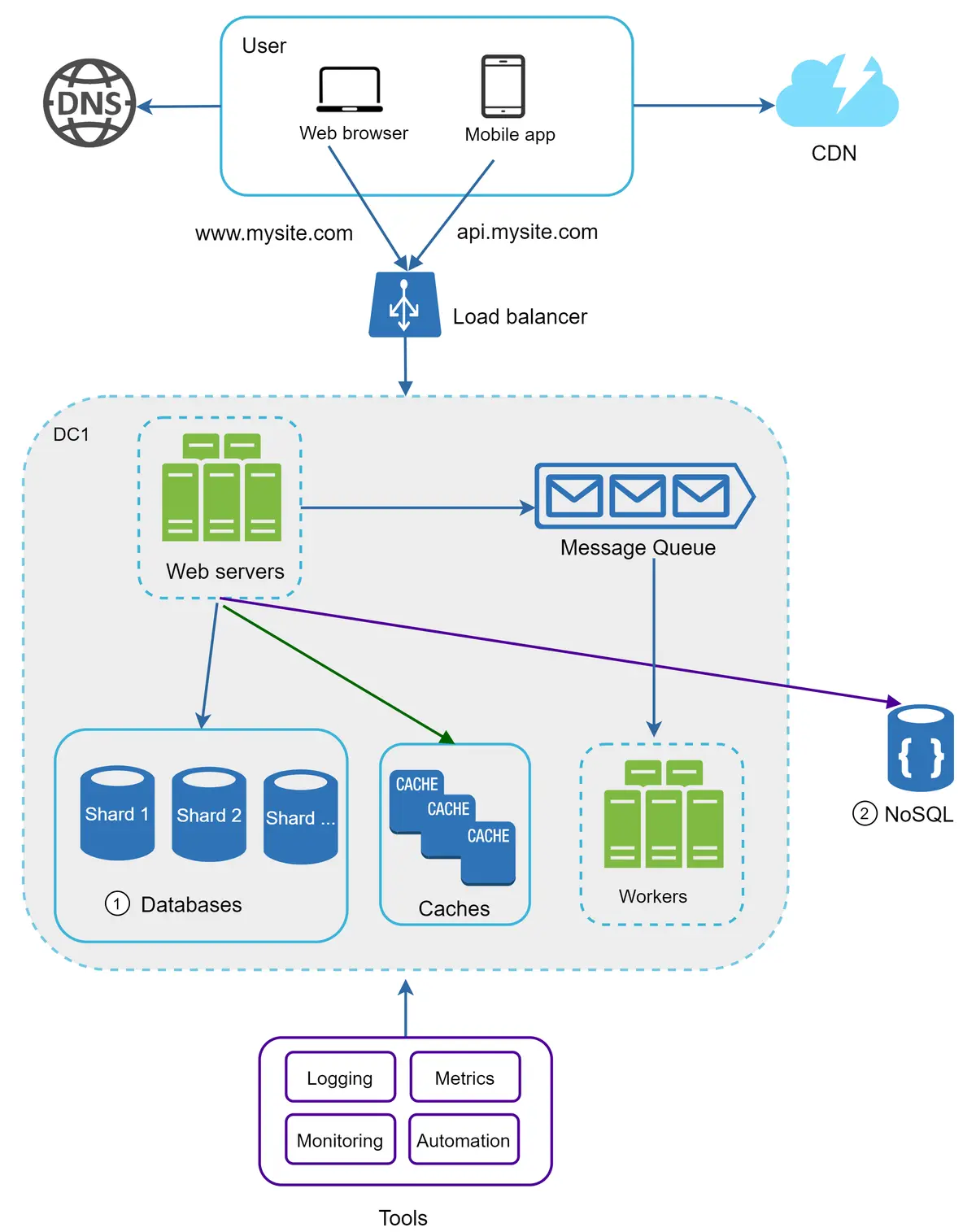
n Figure 23, we shard databases to support rapidly increasing data traffic. At the same time, some of the non-relational functionalities are moved to a NoSQL data store to reduce the database load. Here is an article that covers many use cases of NoSQL [14].